- java.lang.Object
-
- rx.Observable
<R> -
- rx.subjects.Subject
<T ,T> -
- rx
.subjects .AsyncSubject<T>
- rx
- rx.subjects.Subject
- rx.Observable
-
- Type Parameters:
-
T- the type of item expected to be observed by the Subject
- All Implemented Interfaces:
-
Observer
<T>
public final class AsyncSubject<T> extends Subject
<T ,T> Subject that publishes only the last item observed to eachObserverthat has subscribed, when the sourceObservablecompletes.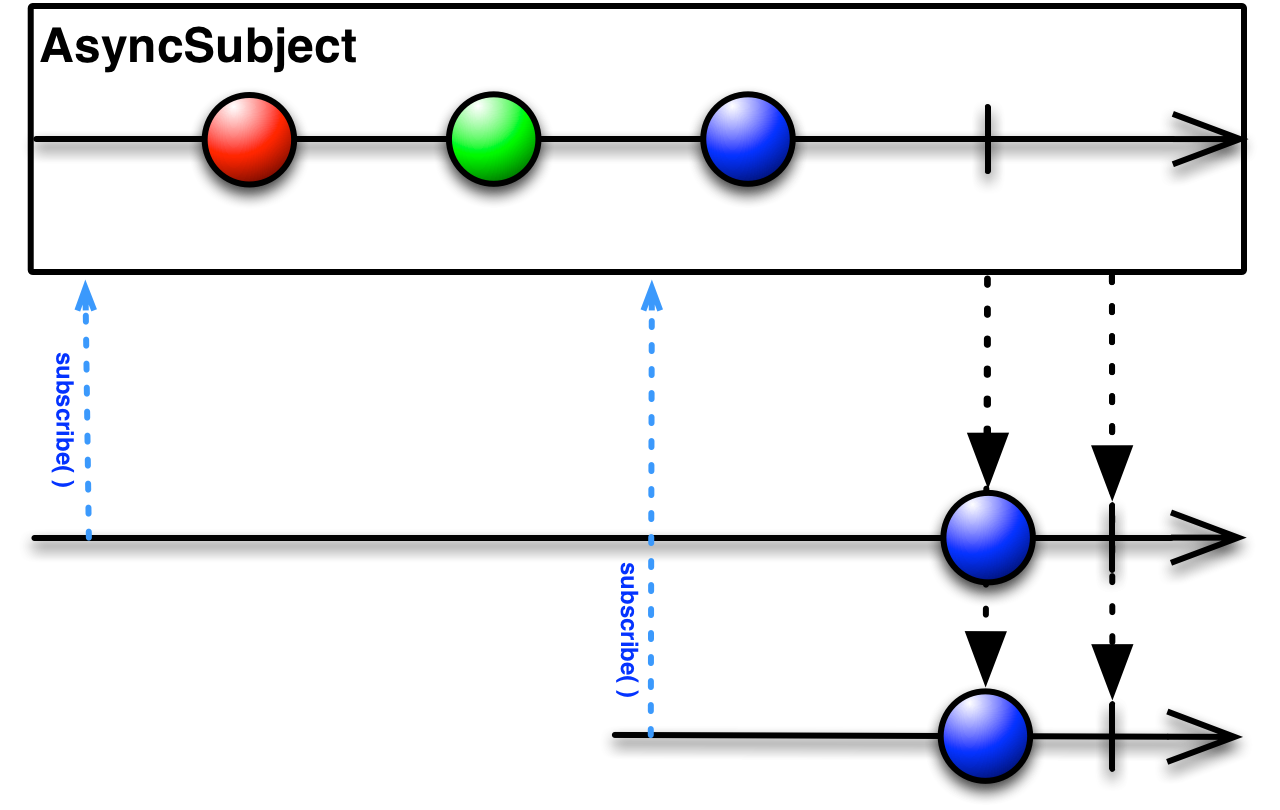
Example usage:
// observer will receive no onNext events because the subject.onCompleted() isn't called. AsyncSubject<Object> subject = AsyncSubject.create(); subject.subscribe(observer); subject.onNext("one"); subject.onNext("two"); subject.onNext("three"); // observer will receive "three" as the only onNext event. AsyncSubject<Object> subject = AsyncSubject.create(); subject.subscribe(observer); subject.onNext("one"); subject.onNext("two"); subject.onNext("three"); subject.onCompleted();
-
-
Nested Class Summary
-
Nested classes/interfaces inherited from class rx
.Observable Observable.OnSubscribe <T>, Observable .Operator <R ,T>, Observable .Transformer <T ,R>
-
-
Constructor Summary
Constructors
Modifier Constructor and Description protectedAsyncSubject(Observable.OnSubscribe <T> onSubscribe, rx .subjects .SubjectSubscriptionManager <T> state)
-
Method Summary
Modifier and Type Method and Description static <T> AsyncSubject<T> create()Creates and returns a newAsyncSubject.ThrowablegetThrowable()Returns the Throwable that terminated the Subject.TgetValue()Returns the current value of the Subject if there is such a value and the subject hasn't terminated with an exception.T[]getValues(T[] a)Deprecated.booleanhasCompleted()Check if the Subject has terminated normally.booleanhasObservers()booleanhasThrowable()Check if the Subject has terminated with an exception.booleanhasValue()Check if the Subject has a value.voidonCompleted()Notifies the Observer that theObservablehas finished sending push-based notifications.voidonError(Throwablee) Notifies the Observer that theObservablehas experienced an error condition.voidonNext(T v)Provides the Observer with a new item to observe.-
Methods inherited from class rx
.subjects .Subject getValues, toSerialized
-
Methods inherited from class rx
.Observable all, amb, amb, amb, amb, amb, amb, amb, amb, amb, ambWith, asObservable, buffer, buffer, buffer, buffer, buffer, buffer, buffer, buffer, buffer, buffer, buffer, buffer, cache, cache, cast, collect, combineLatest, combineLatest, combineLatest, combineLatest, combineLatest, combineLatest, combineLatest, combineLatest, combineLatest, compose, concat, concat, concat, concat, concat, concat, concat, concat, concat, concatEager, concatEager, concatEager, concatEager, concatEager, concatEager, concatEager, concatEager, concatEager, concatEager, concatEager, concatEager, concatMap, concatMapEager, concatMapEager, concatWith, contains, count, countLong, create, debounce, debounce, debounce, defaultIfEmpty, defer, delay, delay, delay, delay, delaySubscription, delaySubscription, delaySubscription, dematerialize, distinct, distinct, distinctUntilChanged, distinctUntilChanged, doOnCompleted, doOnEach, doOnEach, doOnError, doOnNext, doOnRequest, doOnSubscribe, doOnTerminate, doOnUnsubscribe, elementAt, elementAtOrDefault, empty, error, exists, extend, filter, finallyDo, first, first, firstOrDefault, firstOrDefault, flatMap, flatMap, flatMap, flatMap, flatMap, flatMap, flatMapIterable, flatMapIterable, forEach, forEach, forEach, from, from, from, from, from, fromCallable, groupBy, groupBy, groupJoin, ignoreElements, interval, interval, interval, interval, isEmpty, join, just, just, just, just, just, just, just, just, just, just, last, last, lastOrDefault, lastOrDefault, lift, limit, map, materialize, merge, merge, merge, merge, merge, merge, merge, merge, merge, merge, merge, merge, merge, merge, mergeDelayError, mergeDelayError, mergeDelayError, mergeDelayError, mergeDelayError, mergeDelayError, mergeDelayError, mergeDelayError, mergeDelayError, mergeDelayError, mergeWith, nest, never, observeOn, ofType, onBackpressureBlock, onBackpressureBlock, onBackpressureBuffer, onBackpressureBuffer, onBackpressureBuffer, onBackpressureDrop, onBackpressureDrop, onBackpressureLatest, onErrorResumeNext, onErrorResumeNext, onErrorReturn, onExceptionResumeNext, publish, publish, range, range, reduce, reduce, repeat, repeat, repeat, repeat, repeatWhen, repeatWhen, replay, replay, replay, replay, replay, replay, replay, replay, replay, replay, replay, replay, replay, replay, replay, replay, retry, retry, retry, retryWhen, retryWhen, sample, sample, sample, scan, scan, sequenceEqual, sequenceEqual, serialize, share, single, single, singleOrDefault, singleOrDefault, skip, skip, skip, skipLast, skipLast, skipLast, skipUntil, skipWhile, startWith, startWith, startWith, startWith, startWith, startWith, startWith, startWith, startWith, startWith, startWith, subscribe, subscribe, subscribe, subscribe, subscribe, subscribe, subscribeOn, switchIfEmpty, switchMap, switchOnNext, take, take, take, takeFirst, takeLast, takeLast, takeLast, takeLast, takeLast, takeLastBuffer, takeLastBuffer, takeLastBuffer, takeLastBuffer, takeLastBuffer, takeUntil, takeUntil, takeWhile, throttleFirst, throttleFirst, throttleLast, throttleLast, throttleWithTimeout, throttleWithTimeout, timeInterval, timeInterval, timeout, timeout, timeout, timeout, timeout, timeout, timeout, timeout, timer, timer, timer, timer, timestamp, timestamp, toBlocking, toList, toMap, toMap, toMap, toMultimap, toMultimap, toMultimap, toMultimap, toSingle, toSortedList, toSortedList, toSortedList, toSortedList, unsafeSubscribe, unsubscribeOn, using, using, window, window, window, window, window, window, window, window, window, window, window, window, withLatestFrom, zip, zip, zip, zip, zip, zip, zip, zip, zip, zip, zipWith, zipWith
-
-
-
-
Constructor Detail
AsyncSubject
protected AsyncSubject(Observable
.OnSubscribe <T> onSubscribe, rx .subjects .SubjectSubscriptionManager <T> state)
-
Method Detail
create
public static <T> AsyncSubject
<T> create() Creates and returns a newAsyncSubject.- Type Parameters:
-
T- the result value type - Returns:
-
the new
AsyncSubject
onCompleted
public void onCompleted()
Description copied from interface:ObserverNotifies the Observer that theObservablehas finished sending push-based notifications.The
Observablewill not call this method if it callsObserver..onError(java.lang.Throwable)
onError
public void onError(Throwable
e) Description copied from interface:ObserverNotifies the Observer that theObservablehas experienced an error condition.If the
Observablecalls this method, it will not thereafter callObserveror.onNext(T) Observer..onCompleted() - Parameters:
-
e- the exception encountered by the Observable
onNext
public void onNext(T v)
Description copied from interface:ObserverProvides the Observer with a new item to observe.The
Observablemay call this method 0 or more times.The
Observablewill not call this method again after it calls eitherObserveror.onCompleted() Observer..onError(java.lang.Throwable) - Parameters:
-
v- the item emitted by the Observable
hasObservers
public boolean hasObservers()
Description copied from class:Subject- Specified by:
-
hasObserversin classSubject<T ,T> - Returns:
- true if there is at least one Observer subscribed to this Subject, false otherwise
hasValue
@Experimental
public boolean hasValue()
Check if the Subject has a value.Use the
getValue()method to retrieve such a value.Note that unless
hasCompleted()orhasThrowable()returns true, the value retrieved bygetValue()may get outdated.
hasThrowable
@Experimental
public boolean hasThrowable()
Check if the Subject has terminated with an exception.- Overrides:
-
hasThrowablein classSubject<T ,T> - Returns:
-
true if the subject has received a throwable through
onError.
hasCompleted
@Experimental
public boolean hasCompleted()
Check if the Subject has terminated normally.- Overrides:
-
hasCompletedin classSubject<T ,T> - Returns:
-
true if the subject completed normally via
onCompleted()
getValue
@Experimental
public T getValue()
Returns the current value of the Subject if there is such a value and the subject hasn't terminated with an exception.The method can return
nullfor various reasons. UsehasValue(),hasThrowable()andhasCompleted()to determine if suchnullis a valid value, there was an exception or the Subject terminated without receiving any value.
getThrowable
@Experimental
public Throwable getThrowable()
Returns the Throwable that terminated the Subject.- Overrides:
-
getThrowablein classSubject<T ,T> - Returns:
-
the Throwable that terminated the Subject or
nullif the subject hasn't terminated yet or it terminated normally.
getValues
@Experimental
 @Deprecated
public T[] getValues(T[] a)
Deprecated.Description copied from class:SubjectReturns a snapshot of the currently buffered non-terminal events into the providedaarray or creates a new array if it has not enough capacity.If the subject's values fit in the specified array with room to spare (i.e., the array has more elements than the list), the element in the array immediately following the end of the subject's values is set to
null.The operation is threadsafe.
-